1. What Is An iTunes Digital Booklet?
Apple makes iTunes digital booklets available in PDF format. An iTunes digital booklet acts as the digital equivalent of the liner notes often included with physical releases.
By adding a digital booklet to your release, you can share extra content with fans, such as lyrics, images, and detailed liner notes.
When a release includes a digital booklet, iTunes automatically bundles the booklet with each purchase. However, digital booklets are only available as an Album Only item. This means that the booklet cannot be downloaded individually and will only be made available when purchasing the entire release.
2. Does It Cost Anything To Include A Digital Booklet As Part Of My Release?
Adding a digital booklet is free at the time of initial delivery if you are on one of our Plus, Pro, or Premium subscription plans. We’ll encode and deliver your booklet to iTunes at no extra cost as part of your release submission.
As of October 2025, you can also add booklets to existing releases – they no longer need to be included at the time of first delivery.
If you’d like to add a booklet to an existing live release that doesn’t currently have one, you’ll still need to be on a Plus, Pro, or Premium plan. In this case, a one-time delivery fee of £15 applies to add the booklet after the initial release has gone live. If you’re interested in doing this, read our guide on it here: How Do I Add a Digital Booklet to a Release After It Has Gone Live?
3. How Do I Create An iTunes Digital Booklet?
You can use your graphics software of choice to create your booklet, however it is important that it is designed specifically for the iTunes store and meets all of the below specifications.
Due to various specifications that iTunes require your booklet to meet, if you’re unfamiliar with graphics software, you may want to consider asking your designer to compile your digital booklet at the same time as any other artwork you’re having prepared.
Technical Specifications
- PDF format (.pdf)
- 72 dpi minimum
- Width 11 inches x height 8.265 inches
- RGB colour formatted
- Minimum 4 pages in length
- Embed all fonts and images
- All images full-bleed. No negative space surrounding the document
- 1-up page layout (Recommended)
- Tested and viewed in both Preview and Acrobat
- File size should be reasonable (8 – 10 MB max.)
* If your digital booklet is many pages, consider using fewer images or optimizing images to achieve lower overall file size.
Content Considerations
- All text/images to be viewed horizontally
- No bar codes, crop or printers marks
- No links to outside iTunes sources of purchase
- Number all pages
- No time-sensitive information ie. Tour dates
- No web URLs apart from links to artist/band or label website
4. How Do I Add a Booklet to my Release through EmuBands?
This is simple – when adding a release to your EmuBands account, simply opt-in to the iTunes Digital Booklet option on the ‘Extras’ page. The digital booklet option will show for you if you have an active Plus, Pro or Premium subscription. Not on a plan? You can subscribe via the ‘Subscription’ section of your account dashboard when signed in. Sign in here.
If you’re looking to add a digital booklet after your release has been delivered to iTunes/Apple Music, the process is slightly different. Read our guide on it here: How Do I Add a Digital Booklet to a Release After It Has Gone Live?
5. How Do Fans Access My Booklet After They’ve Downloaded My Release?
After downloading a release with a digital booklet, the booklet will automatically appear in their iTunes Music Library.
6. Examples
To give you an idea of the type of content that it’s possible to include, below you can find an example from previously distributed booklets –
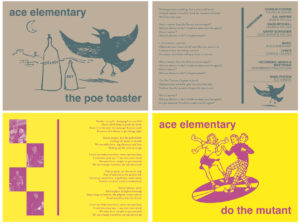
Each image is a single page, and the PDF is delivered as a 4-page booklet, with each page being separate.
Check out “The Poe Toaster” by Ace Elementary here.
—
About EmuBands
Formed in 2005, EmuBands is the trusted partner of thousands of artists, labels and managers across the world. With supercharged release features and expert support, we provide a low-cost solution to distribute your music, allowing you to retain control of your copyright and keep 100% of your royalties. Review our Pricing, Services, and Sign-Up today.