Bring Your Music To Life With Apple Music Album Motion Artwork

If you’re looking for a powerful way to stand out on Apple Music, then Apple Music Album Motion artwork is one of the most exciting creative tools available to artists right now. At EmuBands, we see it as more than just an animation. It is a chance to elevate your visual identity, pull listeners deeper into your world and create an engaging first impression.
Whether you’re releasing your very first single or refreshing a classic from your catalogue, Apple Music Album Motion artwork can transform how fans experience your music. If you are not an expert in video editing – don’t worry! We have partnered with Rotor Videos by LyricFind to launch VideoSuite, so you can create Apple Music Album Motion artwork quickly and easily without any editing experience, and we will cover how to do that later in this article. Here is everything you need to know to make the most of it. Begin creating yours now.
What Apple Music Motion artwork actually is
Think of Apple Music Album Motion artwork as your album cover, reimagined as a living visual. Instead of a static square, your artwork becomes a subtle, looping animated piece that plays while listeners stream your music.
These animations enhance the mood of your cover without distracting from the artwork itself. Used well, they increase listener engagement and help your release feel more interesting and modern.
Who can use Apple Music Album Motion artwork through EmuBands?
Every EmuBands artist has access to Apple Music Album Motion artwork, whether you are working on a brand-new release or updating a long-standing catalogue.
Where your Apple Music Album Motion artwork appears
Apple Music displays Apple Music Album Motion artwork in the most important places where fans discover and interact with your music.
- Album and single pages
- Artist profile pages
- Playlist placements
- Search results
- Now Playing screens
- Apple Music browse sections
In short, almost everywhere your music appears.
What makes Apple Music Album Motion artwork effective
The secret is simplicity. Apple favours artwork that feels natural, not overly busy.
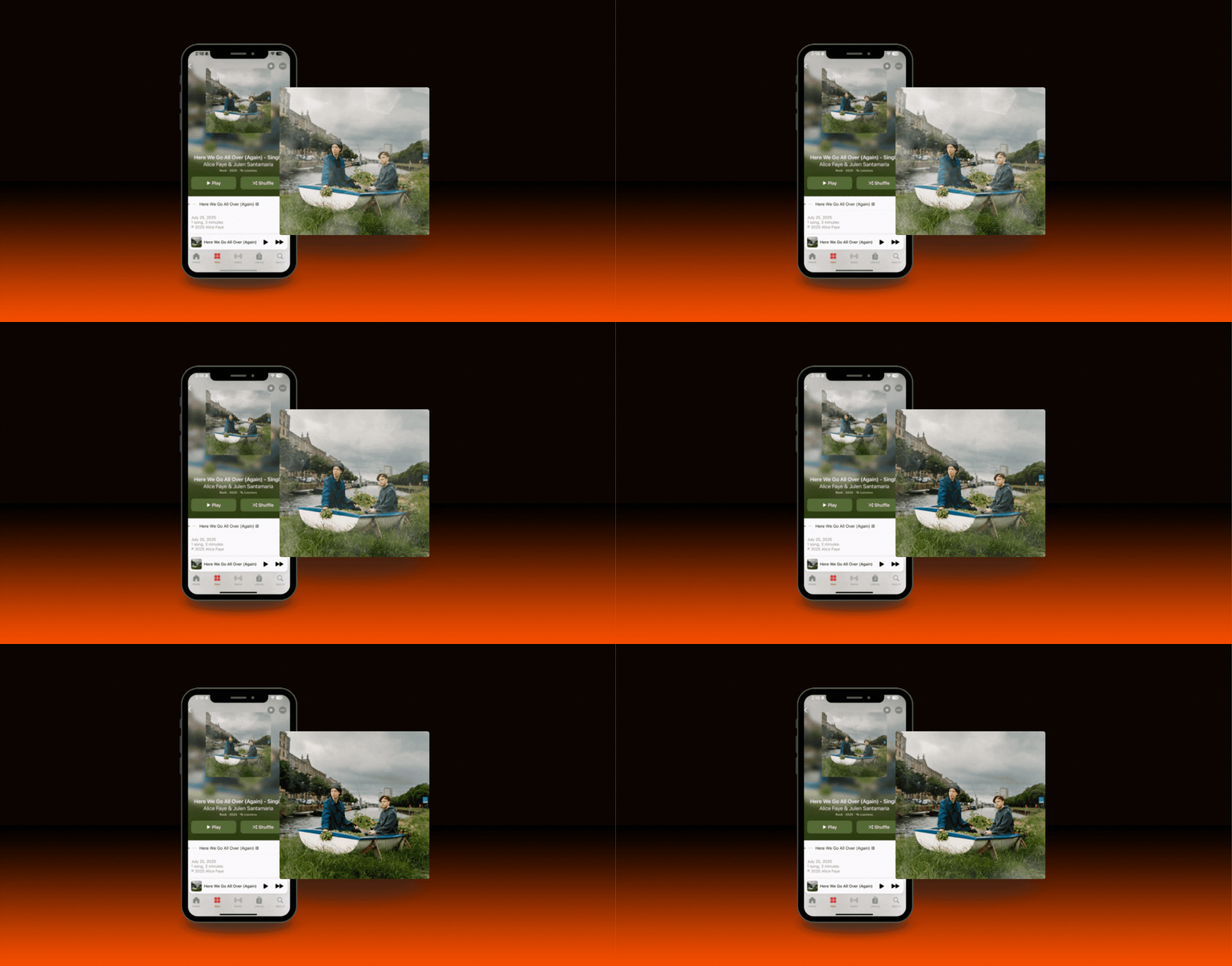
Gentle texture movement, drifting elements, glowing details and soft environmental animations work beautifully. You want something that enhances the original cover rather than replaces it.
Here’s a good example of this in practice with Alice Faye and Julen Santamaria’s single Here We Go All Over (Again):
Creating Apple Music Album Motion artwork with EmuBands VideoSuite (powered by Rotor Videos)
The easiest and most reliable approach is using EmuBands VideoSuite (powered by Rotor Videos). It is our easy-to-use Apple Music Album Motion artwork creation tool that ensures your video automatically meets Apple’s creative and technical standards. It removes the risk of rejections, quality issues or delays, and frees you from dealing with complex file specs or looping issues that can lead to hidden releases.
VideoSuite gives you a fast way to generate consistent animated visuals for every release across the year, not just the big singles.
If you want editable templates built specifically for album and single art, VideoSuite offers a growing library designed around modern streaming aesthetics. This helps you create high impact visuals even if you have no design experience. Get started on yours.
When And How To Opt In
You can add Apple Music Album Motion artwork at almost any stage.
- New or unconfirmed releases: Opt in on the Optional Extras page
- Checkout: Add it during the payment stage
- Existing or live releases: Add it from your Release Review page
You do not need artwork ready to go for us to distribute your music. We prioritise getting your audio live, and you can upload Apple Music Album Motion artwork later.
For New Releases
If you upload your artwork and audio, we’ll guide you to the Apple Music Album Motion artwork page automatically. Upload your animated files and confirm, or skip it and send the release live. You can always return to it later.
Submitting Files Later
If you choose to upload your animation after the release goes live, you will see a reminder on your Releases page. Simply click into the release and upload the files whenever you are ready.
Technical Specs
To learn about the Technical Specs, we’ve created this guide here:
What are the tech specifications for Apple Music Album Motion artwork?
These requirements are strict, so double check before submitting. If you create your Apple Music Album Motion artwork through VideoSuite, your file will automatically meet Apple’s technical specifications, so you do not need to worry about formatting or settings.
What EmuBands charges
We charge a £5 fee per release (6 USD or 6 EUR) for Apple Music Album Motion artwork delivery.
This cost reflects the review and delivery process involved in getting your assets to Apple. It applies solely to the delivery stage. Creation of Apple Music Album Motion artwork is handled separately through VideoSuite (powered by Rotor Videos), where artists can produce high quality visuals with ease. There is a small additional fee for using VideoSuite. More details on VideoSuite.
When it goes live on Apple Music
Once Apple receives the assets, Apple Music Album Motion artwork usually appears within 24 to 48 hours. For best results, upload at least one week before your planned release date.
If Apple rejects your Apple Music Album Motion artwork
If we spot an issue, we will reject it internally and explain what needs fixing. If Apple rejects it after we approve it, our Artist Relations team will review. Refunds in these cases are handled individually.
Can you create your own Apple Music Album Motion artwork?
Absolutely. Any artist can create Apple Music Album Motion artwork using video editing tools as long as the final piece meets Apple’s technical and creative requirements. If you are producing it independently, double checking specs is essential.
If you would prefer a faster, guided and more predictable route, VideoSuite gives you an artist friendly way to create visuals that meet Apple’s strict criteria without the trial and error.
Get started with creating yours now.
Ready to see how simple it is to create Apple Music Album Motion artwork?
Watch the quick walkthrough video and experience how fast you can build standout Apple Music Album Motion artwork with VideoSuite (powered by Rotor Videos). It shows the full process step by step so you can start bringing your music to life.
Watch the video and create your Apple Music Album Motion artwork.
—
About EmuBands
Formed in 2005, EmuBands is the trusted partner of thousands of artists, labels and managers across the world. With supercharged release features and expert support, we provide a low-cost solution to distribute your music, allowing you to retain control of your copyright and keep 100% of your royalties. Review our Pricing, Services, and Sign-Up today