YouTube for Artists: A Guide to Features, Tools and Benefits
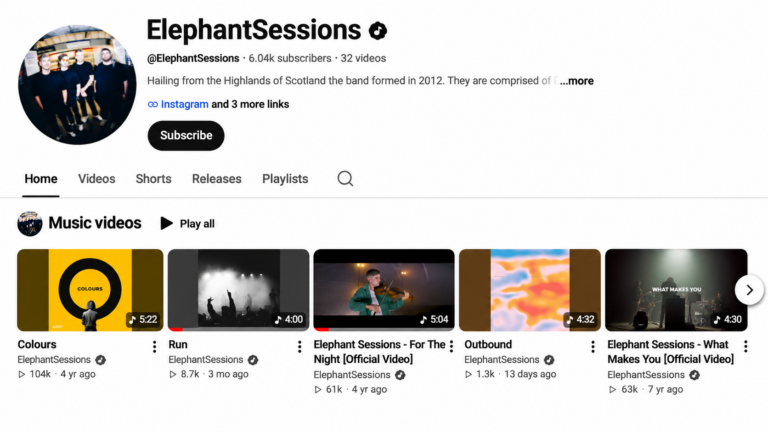
YouTube offers artists a range of tools to help them promote their music, grow their audience and understand how listeners are engaging with their content.
Through YouTube for Artists, musicians can access features such as Official Artist Channels, detailed analytics, channel customisation and promotional tools designed specifically for music creators.
In this guide, we’ll take a closer look at what’s available, how to make the most of these features and how EmuBands can help you get started.
What is YouTube for Artists?
YouTube for Artists is a collection of tools and resources designed to help musicians manage their presence across YouTube and YouTube Music.
It brings together features that help artists organise their music, understand their audience and promote their releases. One of the most important is the Official Artist Channel (OAC), which provides a central destination for an artist’s music and content.
Although many of YouTube’s promotional tools are available to all creators, an Official Artist Channel provides additional functionality specifically designed for musicians, including access to Analytics for Artists.
What is an Official Artist Channel?
An Official Artist Channel brings together an artist’s music and eligible associated YouTube channels into one central destination.
Artists often have music spread across several channels, including their own YouTube channel, an automatically generated Topic channel and, in some cases, a Vevo channel. An Official Artist Channel brings this content together, making it easier for listeners to find an artist’s releases and subscribe to their channel.
Official Artist Channels are identified by a music note icon next to the artist’s name.
Once approved, subscribers from eligible associated channels are consolidated under the Official Artist Channel, helping artists manage their audience and promote new music more effectively.
How to Get an Official Artist Channel With EmuBands
EmuBands Pro and Premium subscribers can request an Official Artist Channel through our team, provided they meet YouTube’s eligibility requirements.
To qualify for an Official Artist Channel, YouTube requires artists to:
- Own and operate a YouTube channel that represents a single artist or band and is focused on their music.
- Have at least one official music release on YouTube, delivered through a music distributor or record label.
- Comply with YouTube’s Community Guidelines, Terms of Service and copyright policies.
YouTube also recommends having at least one publicly uploaded video on your artist channel, in addition to your officially distributed music. Applications without a public video may require additional verification or be rejected.
If you have an active EmuBands Pro or Premium subscription and meet these requirements, contact your account manager, and we can submit an application on your behalf.
Applications are subject to YouTube’s approval, so meeting the eligibility requirements does not guarantee that an Official Artist Channel will be granted.
You can find more information in YouTube’s Official Artist Channel eligibility guidelines.
Bring Your Music Together in One Place
One of the main benefits of an Official Artist Channel is having your music organised in one location.
Rather than directing listeners to different channels to find your music videos, official audio releases and other content, you can provide a single destination for your catalogue.
YouTube automatically organises eligible content into sections, making it easier for fans to explore your releases, while subscribers from associated channels are brought together under your Official Artist Channel.
This can be particularly useful when promoting new music, as listeners have a clear place to find your latest releases alongside your existing catalogue.
Customise Your Channel
YouTube provides several options for organising your channel and deciding which content visitors see first.
Taking the time to customise your channel can make it easier for fans to find your music, discover other content and stay up to date with your latest activity.
Channel Trailers and Featured Videos
You can select a channel trailer for visitors who haven’t subscribed to your channel, as well as a separate featured video for returning subscribers.
For example, you might choose to introduce new visitors to your music through one of your most popular videos, while using the featured video for subscribers to promote your latest release or an upcoming tour.
To manage these features, open YouTube Studio, navigate to Customisation and select the Home tab. From there, you can choose your channel trailer, featured video and other homepage content.
Organise Your Content With Channel Sections
Official Artist Channels can automatically display sections such as Music Videos and Albums & Singles, helping listeners explore your catalogue.
You can also add and rearrange sections to highlight other types of content.
Depending on the content you produce, you might want to create sections for:
- Live performances and acoustic sessions.
- Behind-the-scenes footage.
- Interviews and television appearances.
- Music videos.
- Fan favourites or selected playlists.
Organising your channel around the content your audience is most interested in can help visitors discover more of your music.
Manage Your Artist Profile
Your artist profile helps establish a consistent identity across YouTube and YouTube Music.
Through YouTube Studio, you can manage your artist biography and upload images that represent you and your music. These images may appear across YouTube Music, playlists, search results and other areas of the platform.
For artist gallery images, YouTube recommends the following specifications:
- Landscape orientation.
- Minimum dimensions of 5120 x 2880 pixels.
- Resolution of at least 150 dpi.
- JPG or PNG format.
- Clear visibility of the artist or band members.
- No text or album artwork.
Images may be cropped differently depending on where they appear, so it’s worth leaving enough space around the subject.
Your channel profile picture and banner artwork are managed separately and have their own requirements.
Create and Promote Playlists
Playlists are a useful way to organise your content and encourage listeners to explore more of your catalogue.
Rather than relying on fans to find individual videos, you can group related content together and make it easier for viewers to move between releases.
For example, you could create playlists featuring live performances, acoustic versions, interviews or music videos from a particular album campaign.
You could also build a playlist around a new release, bringing together the official music video, behind-the-scenes footage and live performances of the track.
Playlists can be featured on your channel homepage and shared through video descriptions, cards and other promotional channels.
Keeping them organised and up to date gives listeners another way to discover your music.
Promote Your Concerts and Tours
YouTube offers eligible artists the ability to display upcoming concerts and ticket information alongside their music content.
Depending on the viewer’s location and the availability of event information, fans may see upcoming performances and links to purchase tickets.
YouTube works with Bandsintown to provide concert information, making it important to ensure your upcoming tour dates are correctly listed on your Bandsintown artist profile.
For eligible artists, concert ticketing features are generally enabled automatically. You can check your upcoming events and manage available settings through the Concerts section of YouTube Studio.
Availability depends on factors including your channel’s eligibility, supported territories and the information provided by participating concert and ticketing partners.
You can find more information in YouTube’s concert ticketing guidance.
Engage With Your Audience Through YouTube Posts
YouTube posts allow you to share updates and interact with your audience without having to publish a new video.
You can use posts to share announcements, images, polls, quizzes and other content, giving fans another way to engage with your activity.
For musicians, posts can be particularly useful when promoting new releases, announcing tour dates or asking fans for feedback.
Posts may appear on your channel, in subscribers’ feeds and as recommendations to other YouTube users.
To create a post, sign in to YouTube and select Create, followed by Create post.
YouTube also offers Communities for eligible channels, providing a space where subscribers can start discussions and interact with one another.
As with any social platform, regularly engaging with your audience can make a difference. Responding to comments, answering questions and acknowledging fan contributions can help encourage further interaction.
Understand Your Audience With Analytics for Artists
Analytics for Artists provides detailed information about how your music is performing across YouTube.
Alongside the analytics available to other YouTube creators, artists with Official Artist Channels can access additional insights into how their music is being discovered and used across the platform.
These include:
- Views, watch time and unique viewers.
- Subscriber growth and audience engagement.
- Traffic sources and how viewers discover your music.
- Performance of individual songs and videos.
- Playlists generating traffic to your content.
- How your music is being used in Shorts and other videos.
- Audience demographics and geographic information.
One particularly useful feature is the ability to understand how your music is performing beyond the videos uploaded to your own channel.
For example, you can explore activity associated with your official music videos, Art Tracks and eligible videos uploaded by other creators that use your music.
Analytics for Artists is available through YouTube Studio on desktop and through the YouTube Studio mobile app.
Reviewing this information regularly can help you understand which songs, videos and promotional activities are connecting with listeners, allowing you to make more informed decisions about future releases.
Connect With Fans Through Live Streaming
Live streaming provides another opportunity to engage directly with your audience.
Artists can use live video for acoustic performances, album announcements, question-and-answer sessions or behind-the-scenes content from recording sessions and tours.
Unlike a traditional video upload, live streaming allows fans to interact with you in real time through comments and live chat.
To get started, open YouTube Studio and select Create, followed by Go live.
Your channel will need to meet YouTube’s live streaming eligibility requirements, with additional conditions applying to mobile live streaming.
It’s worth promoting your live stream in advance through YouTube posts, social media and other channels to give fans an opportunity to plan ahead.
You can also encourage subscribers to enable notifications so they’re more likely to know when you’re going live.
Reach New Listeners With YouTube Shorts
YouTube Shorts provides another way for artists to introduce their music to new audiences through short-form video.
Shorts can be used to share previews of upcoming releases, clips from live performances, behind-the-scenes footage or other creative content built around your music.
They can also help listeners discover your songs through videos created by other YouTube users.
For example, when creators use your music in their Shorts, it can introduce your tracks to audiences who may not have encountered your releases through traditional music videos or streaming platforms.
Through Analytics for Artists, you can explore how your music is being used in Shorts and identify content that’s generating interest in your catalogue.
As with other forms of promotion, it’s worth experimenting with different types of content and reviewing your analytics to understand what works for your audience.
Artist on the Rise
YouTube’s Artist on the Rise programme is designed to highlight emerging musicians and introduce their music to new audiences.
Selected artists can have a music video featured for 24 hours on a dedicated Artist on the Rise shelf within YouTube’s Music Explore page.
There is no application process. YouTube automatically considers eligible emerging artists based on factors including video views, watch time growth and upload frequency.
Artists must have more than 1,000 subscribers and be based in a supported country. The programme is currently available in the United States and Canada.
Selection isn’t guaranteed, but maintaining an active channel and consistently publishing engaging content can help artists develop their presence on the platform.
Best Practices for Publishing Music Videos on YouTube
Alongside the tools available through YouTube for Artists, there are several straightforward ways to improve how your videos are presented and make your music easier to discover.
Use Clear and Consistent Video Titles
Your video titles should clearly identify the artist and song, making it easy for listeners to find the content they’re looking for.
Using consistent naming conventions also helps distinguish between different versions of a track.
For example:
- Artist Name – Song Title (Official Music Video)
- Artist Name – Song Title (Live)
- Artist Name – Song Title (Acoustic Version)
This approach makes your catalogue easier to navigate and helps viewers understand what to expect from each video.
Choose Effective Thumbnails
Thumbnails are an important part of how your videos appear in search results, recommendations and other areas of YouTube.
Choose clear, high-quality images that represent your music and give viewers a reason to watch.
For standard landscape videos, a 16:9 aspect ratio is generally recommended. Make sure important details remain visible on smaller screens, particularly mobile devices.
Maintaining a consistent visual style across your videos can also make your content easier for fans to recognise.
Make the Most of Video Descriptions
Video descriptions provide an opportunity to give listeners more information about your music and direct them towards other relevant content.
For a music video, you might include information about the release, credits, links to streaming platforms, upcoming tour dates and your social media profiles.
You can also use descriptions to direct viewers towards related videos, playlists or your latest releases.
Keep descriptions relevant and informative, focusing on information that’s genuinely useful to your audience rather than adding unnecessary keywords.
Distribute Your Music to YouTube With EmuBands
YouTube is an important platform for music discovery, giving artists opportunities to reach new listeners, engage with fans and promote their releases.
With EmuBands, you can distribute your music to YouTube Music, Spotify, Apple Music, Amazon Music and other major digital platforms worldwide.
We offer flexible distribution options, including pay-per-release pricing and annual subscriptions, allowing independent artists and labels to choose the approach that works best for them.
EmuBands Pro and Premium subscribers can also request an Official Artist Channel through our team, provided they meet YouTube’s eligibility requirements.
Whether you’re preparing your first release or managing an established catalogue, EmuBands provides the tools and services to help you distribute and promote your music.
Explore our distribution options or get started with EmuBands today.