Can I add or remove a store/DSP from a release that is already live?
Yes. If you have an active release with EmuBands, you can update which Stores/DSPs your release is delivered to from the ‘Releases’ tab in your Dashboard.
You can remove your release from individual Stores/DSPs without taking it down everywhere, or choose to remove it from all applicable Stores/DSPs.
How do I change which stores/DSPs my release is available on?
Go to the ‘Releases‘ tab within your Dashboard, and open the release you want to update by clicking ‘Edit / View’. Scroll down to ‘DSPs selected’, and then click ‘Edit DSPs’.
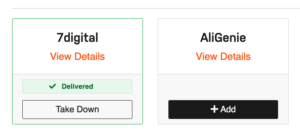
You’ll then see the Stores/DSPs available for that release and their current delivery status.
From here, you can choose to:
- Takedown a release from a store/DSP where it is currently delivered
- Add a store/DSP where the release has not yet been delivered
- Use Select All if you want to make changes across all available stores/DSPs
Once you’ve made your selections, select Submit and confirm your changes.
Can I remove my release from just one store/DSP?
Yes. You don’t need to take your release down everywhere.
Go to ‘Releases’, open the relevant release by clicking ‘Edit / View’, scroll down to ‘DSPs selected’ and click ‘Edit DSPs’.
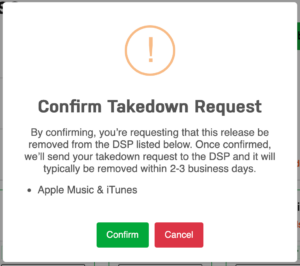
Find the Store/DSP you want your release removed from and select ‘Take Down’. Then click Submit and confirm your request.
We’ll send the takedown request to that Store/DSP for processing.
Can I add my existing release to a new store/DSP?
Yes. If your release has not already been delivered to an available Store/DSP, you can request to add it. Go to ‘Releases’, open the relevant release by clicking ‘Edit / View’, scroll down to ‘DSPs selected’ and click ‘Edit DSPs’.
Find the Store/DSP you want to add and select Add. Then click Submit and confirm your request. We’ll then process the delivery request for that Store/DSP.
Can I make changes to multiple stores/DSPs at once?
Yes. You can make changes to multiple Stores/DSPs before submitting your request.
You can also use ‘Select All’ if you want to make the same type of change across all applicable Stores/DSPs.
What happens after I submit my changes?
We’ll process your request within 1 working day. Once processed, you can generally expect the changes to be reflected on the relevant Stores/DSPs within 48-72 hours. You don’t need to submit your request again while it’s being processed.
How will I know when the change has been processed?
The status shown under ‘DSPs selected’ will update once your request has been processed.
For a newly added Store/DSP, the status will change to ‘Delivered’ once the delivery has been processed. For a Store/DSP you’ve removed, the status will change to ‘Removed’ once the takedown has been processed.
Can I change my mind after submitting a request?
Once a delivery or takedown request has been submitted, it may already be queued for processing. If you’ve made a change by mistake, contact the EmuBands team as soon as possible.
We can’t guarantee that we’ll be able to stop a request once processing has commenced.